


About
Instant Payment Notification (IPN) is PayPal’s message service that sends a notification when a transaction is affected. Once IPN is integrated, sellers can automate their back office so they don’t have to wait for payments to come in to trigger order fulfillment. Before you add Shipwire to your PayPal Cart, Buy Now buttons, or use it with eBay via PayPal, IPN must be configured so that Shipwire is notified when sales occur; IPN is how PayPal communicates to 3rd party carts or fulfillment providers that a transaction is complete.
| Connection Information | |
|---|---|
| Who developed integration: | Shipwire |
| Support Contact: | Website |
| Status: | Clients actively using the connection, no known issues |
| Integrated APIs | |
| Inventory: | |
| Order Entry | ✔ |
| Shipping Rates | |
| Tracking | |
Features
Order Entry – Orders are submitted to Shipwire from your PayPal account automatically via Instant Payment Notification. Once you receive a PayPal payment, Shipwire takes care of the rest.
Configuration
Setup PayPal Instant Payment Notifications (IPN)
- Login to your PayPal account
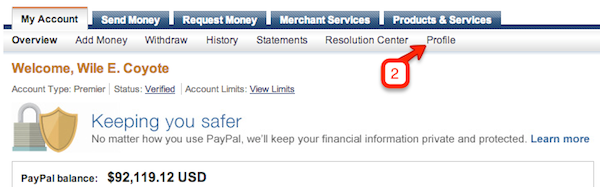
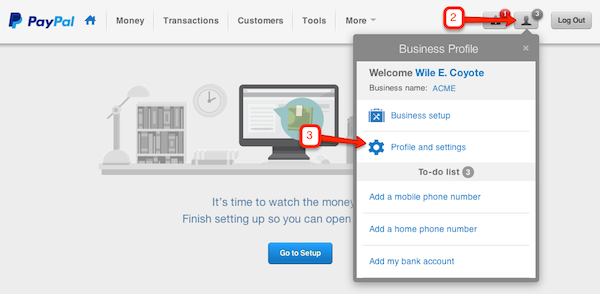
- From the account overview page, click the Profile link.
- On newer PayPal accounts, this will be called “Profile and settings” and will be found by clicking on the Profile icon.
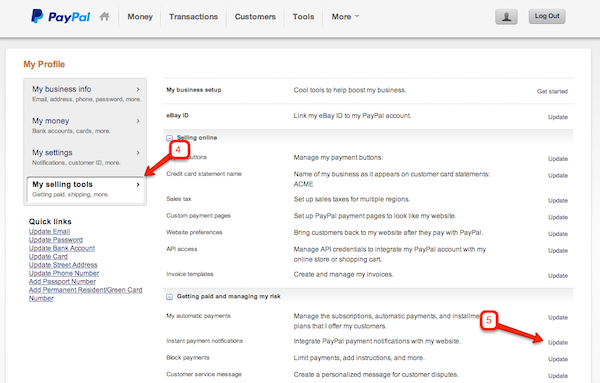
- Click the “My selling tools” section on the lefthand side.
- Click the Update link on the Instant payment notifications line under the “Getting paid and managing my risk” heading.
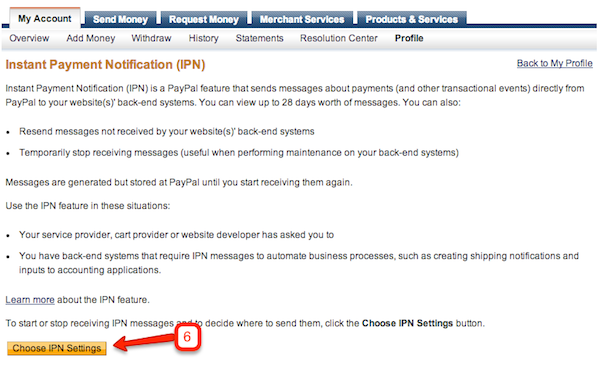
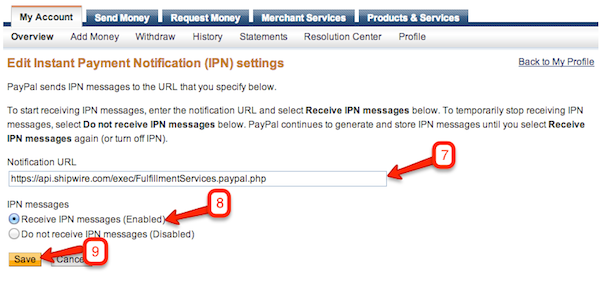
- Click the “Choose IPN Settings” button.
- Paste the following URL into the Notification URL box provided: https://api.shipwire.com/exec/FulfillmentServices.paypal.php
- Select the “Receive IPN messages (Enabled)” option.
- Click Save
Add PayPal in Shipwire account
First, find and connect your cart within your Shipwire account, then follow the steps below to configure it.
- Under the “Sell” tab in you Shipwire account, click the “Configure” button next to PayPal (if you don’t see PayPal, be sure to add the selling tool first.
- Select the IPN Notification tab
- Add your PayPal email address, then click “Save”.
Test IPN configuration
- PayPal Shopping Cart — The Shipwire PayPal IPN connection also works with the PayPal Shopping Cart system. Please note that your Shipwire SKU must be inserted in to the item_number fields to process the correct SKU.
- PayPal Buy Now buttons — Setup your PayPal Buy Now buttons.
- eBay Auctions using IPN — Setup your eBay Auctions.
Test your PayPal IPN setting
The simplest way to test your IPN configuration is to use a PayPal Buy Now button to quickly send an order to Shipwire. After you purchase, you should see your order in your Shipwire account within a few minutes to an hour. If you see your orders, it means that your IPN configuration is ready. Follow these steps to test PayPal IPN:
- Login to your Shipwire account and go to the PayPal IPN sell tool.
- Click on the Shipwire PayPal Buy Now Buttons tab.
- Highlight one of your products.
- Check the sell parameters and set a price and shipping price (use $1 to keep the funds transferred to a minimum), and shipping amount.
- Enter the PayPal email address you use for your IPN configuration.
- We automatically create a button you can use to purchase your product. Click the Buy Now button. This will transition you to PayPal, where you can complete your purchase.
- Login to a separate PayPal account to pay for your test purchase.
NOTE: You must use a different PayPal account to pay for your purchase than you use to take payments. PayPal does not allow you to use the same account to both make the payment and to accept the payment. You will need a PayPal account for testing.
Troubleshooting
If your orders don’t appear in your Shipwire account, one or more of these problems may have occurred:
- PayPal IPN is not configured correctly. Double check your IPN configuration. Be sure to follow the setup instructions carefully.
- You used a different PayPal account to send payment to than your IPN is configured on. Be sure the PayPal email address on the Buy Now page is the same as the IPN configuration page.
- You set your SKU name differently than in your Shipwire Account. This is not likely if you use the button that we generate. If you code your own Buy Now button then the SKU must exactly match your Shipwire SKU name.
- Your SKU may not have any sort of pending or real inventory. For Checkout to work and Shipwire to register your order your SKU past to us needs to have either pending, good, or past good inventory. If you can’t see your SKU listed in the Manage Inventory screen then we can’t create an order for it.
FAQ
Q.What if I want to use PayPal IPN, but I don’t want Shipwire to handle all my products?
A.If you use PayPal IPN, all your orders are sent to Shipwire regardless of origin. This means that unintended orders may will also be sent to Shipwire, with products that Shipwire may not recognize. To handle these situations, go into your Account Settings and edit your Shipping Preferences. Here you can set orders with unknown products to be rejected, held, or shipped with just the products that Shipwire recognizes. Shipwire also will ignore orders automatically that are a result of 3rd party carts, or with parameters passed that are not valid.
Q.I am using my IPN configuration to notify Shipwire of a sale. Can I also use it with my 3rd party cart?
A.No, IPN can only be used with a single cart or fulfillment provider. In general if you use PayPal to take payments for a 3rd party cart then you must configure PayPal IPN to notify your cart. Then the cart will notify Shipwire using a separate API call.
Q.Is it possible to have my cart then call the Shipwire IPN notification URL to pass my order information?
A.No, this is not possible. As part of the IPN security process our servers verify that the IPN notification comes from PayPal (not your cart). We then call back to PayPal to validate the transaction as being genuine.
Q.I am using a cart not supported by Shipwire and I use PayPal for payments. Can I use PayPal IPN as a bridge between my cart and Shipwire?
A.Generally no. As specified in the previous FAQ most carts will use the IPN configuration for their notification. If you do setup the IPN notification URL with the Shipwire IPN notification URL then that will not work as well. Notification via IPN to Shipwire only works under the following three conditions:
1. You are using PayPal Buy Now buttons
2. You are using the PayPal cart
3. You are using PayPal in conjunction with your eBay account (see our eBay sell tool page)
Q.I got an email notice from PayPal regarding IPN notification failure – now what?
A.If PayPal contacts our Shipwire PayPal fulfillment URL but the Shipwire account is not configured to respond to PayPal IPN then it will cause an error in PayPal. In that case PayPal will send a note similar to the following to the PayPal account holder:
Hello <name>,
Please check your server that handles PayPal Instant Payment Notifications (IPN). IPNs sent to the following URL(s) are failing:
https://api.shipwire.com/exec/FulfillmentServices.paypal.php
If you do not recognize this URL, you may be using a service provider that is using IPN on your behalf. Please contact your service provider with the above information. If this problem continues, IPN notification may be disabled for your account.
Thank you for your prompt attention to this issue.
Thanks,
PayPal
There are two possible solutions:
1. Configure your Shipwire PayPal IPN sell tool. Usually this means you enter your PayPal email address into the form. It is very simple.
2. Remove the Shipwire call back URL from your PayPal IPN account.
Q.How do I tell PayPal to resend an IPN request for orders I may have missed?
A.If you find orders on PayPal that are not in your Shipwire account, you can have PayPal resend the IPN request to us for that order. Here is how you do that:
1. Login to you PayPal account
2. Go to My Account – History – IPN History
3. Select in your history the orders you want to resend to us
4. Click the Check Box below the “Resend Selected” button
5. Click Resend Selected
This will cause an IPN request to be sent to Shipwire again where we will capture the order. After this you should see you order reappear usually within a few minutes. Review all the orders to be sure they are correct and that there are no duplicates
Q.What happens if the Shipwire servers are down or otherwise not accessible when a person checks out of my PayPal account?
A.PayPal is a very robust service and will re-send IPN requests on a periodic basis until Shipwire has the order.
Q.What about other Shipwire features like real time rating, carrier selection, inventory and shipment tracking?
A.At this time PayPal IPN only supports basic order fulfillment.
Q.My orders in Shipwire don’t include my customer contact phone #, how can I fix that?
A.By default PayPal Checkout does not require a contact phone number. If no phone # is provided then the order will be passed to Shipwire without it. In that case we use our support phone 650-561-4800. For best results you can configure your PayPal checkout to require the contact phone #. To do this follow these steps:
1. Login to your PayPal account
2. Go to My Account – Profile
3. In the Selling Online section click on Update for Website Preferences
4. In the Contact Telephone Number section select that a phone # is required.
Q.How do I enable PayPal Checkout for shipping types?
A.When PayPal is used for checkout with Buy Now buttons or the PayPal shopping cart you can enable PayPal to provide a shipping service type. PayPal only supports generic service types and provides several methods to calculate shipping rates. There is no direct integration support for specific carriers or with Shipwire Real Time Rating.
1. Login to your PayPal account
2. Go to My Account
3. Select My Selling Tools
4. Click on Shipping Calculations
Follow the steps to set this up. This will allow you to setup your shipping preferences for both domestic and international shipping.
PayPal supports a number of generic shipping types. These are mapped to appropriate Shipwire service levels as follows:
| PayPal Shipping Service Type | Shipwire Service Level | |||
|---|---|---|---|---|
| Service Level Name | International | Ground | 1-Day | 2-Day |
|
Air Service |
|
|
|
✔ |
|
Expedited Air Service |
|
|
|
✔ |
|
Economy |
|
|
|
✔ |
|
Global Priority |
✔ |
|
|
|
|
International Economy |
✔ |
|
|
|
|
International Expedited |
✔ |
|
|
|
|
International Express |
✔ |
|
|
|
|
International Express Air |
✔ |
|
|
|
|
International Priority Air |
✔ |
|
|
|
|
Next Day |
|
|
✔ |
|
|
Next Day Air |
|
|
✔ |
|
|
Next Day Air Economy |
|
|
✔ |
|
|
Overnight |
|
|
✔ |
|
|
Overnight Flat Rate Shipping |
|
|
✔ |
|
|
Pickup |
|
|
✔ |
|
|
Priority |
|
✔ |
|
|
|
Rush Delivery |
|
✔ |
|
|
|
Standard Delivery |
|
✔ |
|
|
|
Standard Expedited |
|
✔ |
|
|
|
Standard Flat Rate Shipping |
|
|
|
✔ |
|
Standard International |
✔ |
|
|
|
|
Standard Shipping |
|
✔ |
|
|
|
Store Pickup |
|
✔ |
|
|
|
2-Day Shipping |
|
|
|
✔ |
|
2-Day Air |
|
|
|
✔ |
|
Worldwide Shipping |
✔ |
|
|
|
If there is no carrier provided or there is not a match then we assume GD shipping.