

Effective Feb. 27, 2015, the new Shipwire V3 UI (User Interface) is being released for General Availability. For more information on all the enhancements, please visit our blog post.
Please note which version of the application your account is currently using, and follow the corresponding instructions below.
You can tell which version you are using by examining the URL after you login to your account.
V2 = app.shipwire.com
V3 = merchant.shipwire.com
Shipwire offers specific guidelines and recommendations on how your products should be defined in your account before being sent to a Shipwire warehouse. Following these guidelines will help ensure that you get the most value out of Shipwire, and will help ensure delivery without errors or delays.
Learn more about Shipwire’s Product Types
If after reviewing this information, you have any additional questions, please contact our friendly Customer Care team.
Product specifications
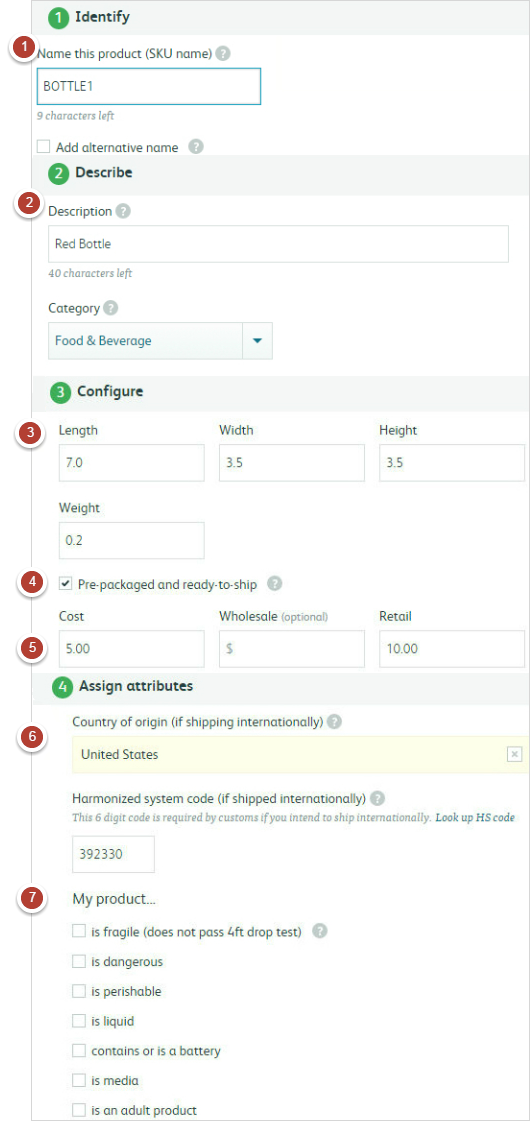
Before you can send product to Shipwire, you need to describe what you will be sending under Manage Products in your Shipwire account. This is where you can fully describe, edit, and add additional details to your product catalog. Shipwire requires fields that let us know enough about your product that we can reliably pack and ship your orders. Below is a quick description of the key fields applicable to most Shipwire product types, as well as general guidelines.
- SKU(Stock Keeping Unit): A unique name for your product. SKUs must be labeled on your product for easy identification, can be up to 15 characters, using only numbers, letters, and dashes (no spaces, punctuation, or other special characters).
- Description: A customer facing description of your product. This helps the customer and warehouse understand the product. Where possible, add the level of detail that might help distinguish this product from a different product (e.g. color, size, packaging description)
- Dimensions/Weight: Ensure accurate shipping rates and quotes by properly describing your product’s dimensions and weight. Failure to do so may result in additional shipping charges. For bulk packing definitions, please see below. Refer to our best practices for optimizing product packing to lower your costs.
- Pre-packaged and Ready-to-Ship: Check this box if your product is pre-packaged and ready to ship as is.
- Costs/Retail: Enter both the cost to manufacture and retail value here. These fields are used for insurance and international customs purposes.
- Customs Specifics: In order to prepare appropriate documentation for international customs, Shipwire needs information regarding the origin of manufacture and HTS code.
- Special Handling: If your base product matches any of these various descriptions, please indicate so here as it may require special handling.
Bulk Packing Definitions:
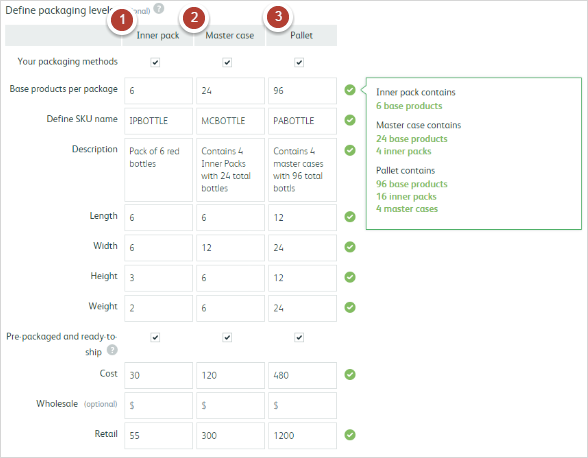
Packing levels provide additional detail on how your product is packaged before it is shipped to the warehouse. Defining your packaging levels is an optional but incredibly useful tool. By fully describing your product line’s hierarchy, you will prevent any possible confusion. Shipwire’s packing levels are:
- Inner Pack: These packs contain more than one of the same SKU. Multiple Inner Packs can be packaged into a Master Case.
- Master Case: The largest packagin level on a pallet. Master cases contain multiples of the same SKU, either as Base Products or Inner Packs
- Pallet: Wooden frames that contain stacked Master Cases.
Related topics
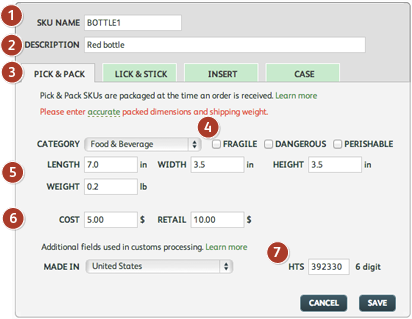
Shipwire offers specific guidelines and recommendations on how your products should be defined in your account before being sent to a Shipwire warehouse. Following these guidelines will help ensure that you get the most value out of Shipwire, and will help ensure delivery without errors or delays.
If after reviewing this information, you have any additional questions, please contact our friendly Customer Care team.
Product specifications
Before you can send product to Shipwire, you need to describe what you will be sending (under Manage Products in your Shipwire account). This is where you can fully describe your product catalog. One big difference you will notice from the product catalog information you may have in your shopping cart is that Shipwire requires fields that let us know enough about your product that we can reliably pack and ship your orders. Below is a quick description of the key fields applicable to most Shipwire product types, as well as general guidelines:
- SKU: Is the unique identifier for your product. SKUs must not be longer than 15 characters and can only include numbers, letters and dashes (no spaces, punctuation, or other special characters).
- Description: This field lets you tell us more about your product. Where possible, add the level of detail that might help distinguish this product from a different product (e.g. color, size, packaging description)
- SKU Types: Shipwire natively supports several different types of products (Pick ‘n Pack, Lick ‘n Stick®, Inserts, Cases). You can learn the basics about these products on our order fulfillment product types page. Case type SKUs are incredibly useful. Please use these liberally to describe any SKU the warehouse may handle that contains a lower level SKU (e.g. a case of 12 pencils). In some instances, your lowest level order taking unit may look to our warehouse like it is a Case type SKU (e.g. a bag of 6 widgets). To prevent any possible for confusion, we strongly advise that you fully define your product line’s hierarchy, down to the lowest level unit – even if you never have any intension of selling that SKU. In the example above, you would define one lower level unit for the contents within the bag, and then you would define the bag of 6 widgets as a case (which can itself be treated as either as either a Pick ‘n Pack or Lick ‘n Stick® unit from an order processing standpoint). When sending in new inventory, or outbound orders, note that you never have to reference this new lowest level unit: its presence simply ensures that our systems have the most complete understanding of how your product is packaged.
- Fragile/Perishable/Dangerous: If you believe your product is likely to require special handling, please let us know by selecting one of these options.
- Dimensions/Weight: Your product’s dimensions and weight will ensure that you get accurate shipping rates and quotes. Failure to enter accurate weights can result in additional shipping charges.
- Cost/Retail: These fields are used for insurance and international customs purposes. It is your responsibility to make sure you have accurate USD cost and retail values in these fields.
- Customs Specifics (Made In/HTS): When your outbound orders are shipped over international borders, Shipwire needs to prepare appropriate documentation for international customs. These specific product-level fields are part of the information requirements. Learn more about HTS codes here.