


Use Same Day Shipping across the Shipwire global warehouse network
Now you can get your products into the hands of your customers faster than ever. With Same Day Shipping from Shipwire, every order submitted (in warehouse) before 5:30 AM LWT (Local Warehouse Time) will ship out that same day. This help article covers the preference settings and other key aspects of Same Day Shipping to help you understand how it works.
- What is Same Day Shipping?
- Pros & cons
- Service level exclusions
- Setting up Order Transmit Times on your account
- When to use expedited handling options
- Reviewing an order for when it will be submitted to the warehouse
- How to report a problem and credits (See report a problem)
What is Same Day Shipping?
Same Day Shipping allows you to send an order to a Shipwire Fulfillment Center where we will pick, pack, and hand the order to the carrier all in the same day. For an order to be shipped the same day, you will need to send it to the warehouse by the local cut-off time.
Here is vocabulary used throughout Shipwire around Same Day Shipping:
Local Warehouse Time (LWT) – For Guaranteed Same Day Shipping, your orders will need to be dropped (an order is dropped when it is automatically submitted and accepted by the warehouse) before 5:30 AM in the destination warehouse’s time zone. For example, for an order shipping from the Shipwire UK warehouse you would ensure that it is submitted no later than 5:30 a.m. GMT, whereas an order shipping out of Los Angeles can be submitted by 5:30 a.m. PST. To keep all of these time zones straight, we refer to the time zone of the destination warehouse as Local Warehouse Time.
Guaranteed Same Day Shipping – We take our shipping guarantees seriously. If you want an order shipped out same day, ensure that it is submitted to the warehouse by 05:30 LWT and we’ll ship it the same day, guaranteed!
Best Effort Same Day Shipping – For orders submitted after 05:30 LWT, we’ll try our best to ship your orders the same day. Although orders received during this time period are not guaranteed to ship the same day, nearly all orders submitted before 10:30 LWT receive Same Day Shipping, and orders submitted before 13:30 LWT get best effort at Same Day Shipping.
Expedited Same Day Options – We know some orders must absolutely go out today even if they are submitted after 05:30 LWT. In these situations, you can upgrade most orders to go out the same same day for a small fee. If we don’t deliver, we’ll automatically refund you for the expedited handling charge.
- Expedited Same Day Guaranteed – Submit the order by 10:30 LWT and for $1.00 per order we’ll ship it out the same day. If we don’t, we’ll credit back the $1 and you’ll get the item handling credits on any qualifying order. We take our shipping guarantees seriously.
- Expedited Same Day – Drop the order by 13:30 LWT and for $2.50 we’ll ship it out the same day. If we don’t, we’ll credit back the $2.50.
Guaranteed Next Business Day – If your order doesn’t qualify for Same Day Shipping, it will go out the next business day, guaranteed!
Order Delay Preference – If you want to give yourself additional time to review automatically transmitted orders (i.e. cart, spreadsheet upload, or API) before they are submitted to the warehouse, you can set up an order delay. This gives you time to make changes before we process your order. At Shipwire, we allow you to run as fast or slow as your business requires.
Pros & cons
Same Day Shipping is an extremely powerful tool, but it may move your orders through the shipping process faster than you want. To find the pace that is just right for you, consider some of the reasons why you may want to use Same Day Shipping with caution:
- You can only edit or change order up until they are submitted to the warehouse. Once an order is submitted, you can no longer edit, change, hold or cancel it.
- Make sure your shopping cart’s fraud prevention systems are rock solid. If you take a day off with Same Day Shipping defaulted “on” and your shopping cart is compromised, the orders may already have left the warehouse by the time you review them. As an alternative, consider setting up order holds that are triggered in your shopping cart for certain patterns or types of orders (e.g. express ship types or expensive international shipping).
- Local Warehouse Time might catch you off guard for International warehouses. Consider when you normally review orders, if that is your business practice, and make sure the first order drop is after that time.
- Same Day Shipping does not mean same day delivery. We use the term “Same Day Shipping” to mean Shipwire makes the order available to the carrier on that day. From there the carrier shipping time lines and delivery commitments rule.
- Allow some time for carriers to update their tracking information. Certain carriers/carrier-options experience a delay in tracking ID’s being available, especially when the order is shipped in the last pickup time available that day. Before you contact Customer Care, please give it a few hours or wait until morning.
Service level exclusions
Some exclusions exist in our service level agreement for Same Day Shipping. While orders with the following service types are not covered under Shipwire’s service level guarantees, we strive to process them within the following timelines:
| Service type | Expected service level |
|---|---|
International orders |
Within same Day SLA + 1 day |
3rd party parcel |
Within same Day SLA + 1 day |
Custom packing list |
Within same Day SLA + 1 day |
Freight |
Typically within 2-5 business days |
Work order |
2-5 business day SLA for work order to complete |
Large variances
In circumstances when large variances exist, exclusions apply to the SLAs.
When running a promotion, or launching a product, there can be large spikes in order volume. When these spikes exceed a 10% increase over daily order volume, and Shipwire was not notified of this spike (forecast) at least 1 week in advance, an exclusion applies to the SLA. In order to ensure the service levels are met, notify Shipwire about your expected volume increase.
Typically only higher-volume merchants will be affected by this exclusion.
How to configure Order Transmit Times in your Shipwire account
Click on your Account name, then select Shipping Preferences from the drop down menu. Scroll down to the Warehouse section of the page:
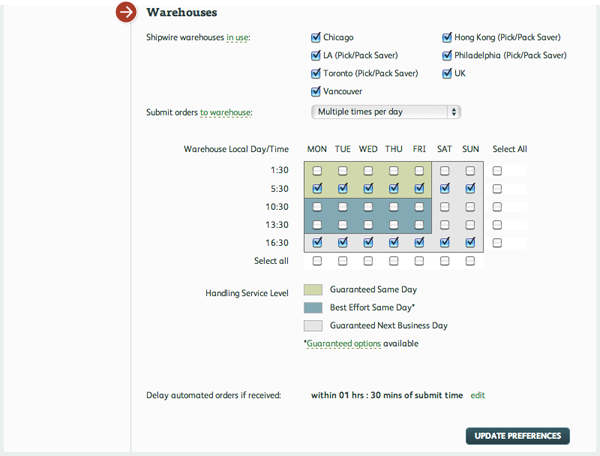
Here you can manage the frequency at which orders are sent to the warehouse and the times orders are submitted to the warehouse. You can also set up order delays for any orders that get submitted by API, shopping cart connection, or spreadsheet upload (this gives you additional time to review orders before they are submitted to the warehouse).
When to use paid expedited handling options
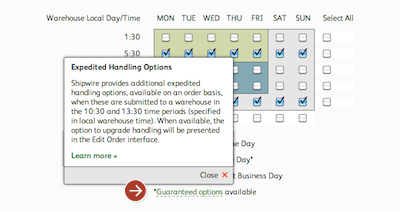
There are two types types of expedited handling, Expedited Same Day Guaranteed and Expedited Same Day, that you may opt use if you want to apply Same Day Shipping to an order that doesn’t make the standard cut-off times. These options are defined above and you can access information about them within your account by clicking the Guaranteed options link beneath the shipping times chart in the Warehouse section of the Preferences page (as shown above).
Expedited handling options are available on an order basis only when orders are submitted to a warehouse in the 10:30 and 13:30 time periods (specified in local warehouse time, excludes holidays and weekends). When available, the option to upgrade handling will be presented in the Edit Order interface. Your account will display the appropriate upgrade option for the order.
Confirm when an order will be transmitted to the warehouse
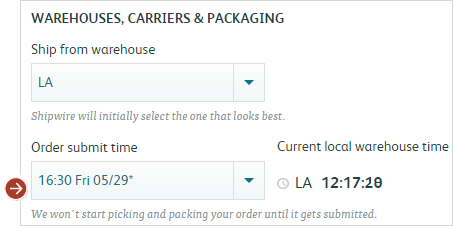
When creating an order (Orders > Create an Order > Step 2) you can see when an order will be submitted to a warehouse, as well as the local warehouse time. You’ll see this each time you create an order, or by selecting a pending order. You can change to a later drop time or delay the order while you get payment, confirm the address, or verify the order.
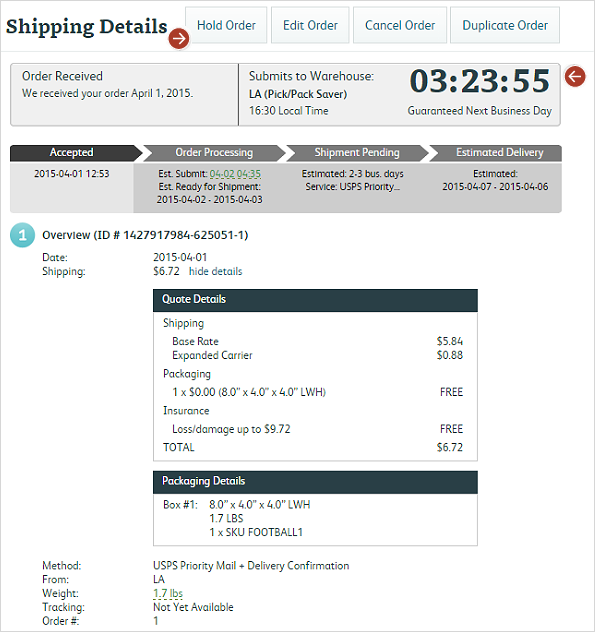
Here (Activity history) you can review your order and edit it before it’s sent to the warehouse. If an order is set to be sent to the warehouse soon and you need time to make edits, you can delay the order. Local warehouse time is indicated on this page for your convenience. NOTE: Once an order is sent to the warehouse, edit features are disabled.
How to report a Same Day Shipping problem
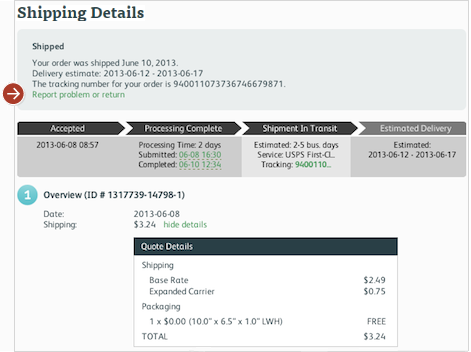
If your order did not meet the standard Same Day Shipping Guarantee, once the order has been delivered, you can report a claim by clicking Report problem or return. Expedited Same Day options are automatically credited 3 days after the order is shipped from the warehouse.