


Shipwire is a powerful cloud-based platform that enables customers to manage eCommerce orders and inventory. Shipwire Anywhere is a solution within the Shipwire Platform that enables fulfillment from virtually any location.
Three models of Shipwire Anywhere
Powerful Global Software for fulfillment from any location where your product ships from. Locations can range from an office, warehouse, garage, repair center, etc. Connect all of your fulfillment locations on one platform to manage orders and inventory. Print shipping labels and custom packing lists and send your order on it’s way. Maintain inventory accuracy and access data on all of your locations.
Blended Fulfillment utilizing a combination of your warehouses and any one or more Ingram Micro fulfillment centers to create a network of fulfillment locations to meet your business needs. With flexible options and international locations, you can test out new markets while seamlessly maintaining your own locations. Manage inventory and order fulfillment across all locations through the Shipwire Platform.
Be a Reliable Dropship Vendor by connecting all of your retail channels to the Shipwire Platform, allowing inventory management and information sharing between you and your dropshippers through one point of contact in the Shipwire Platform.
Get the benefits of:
- Shipwire automation and order management anywhere you store inventory, be that your locations, ours or a combination!
- Intelligent order routing sends orders to the right facility based on cost and time
- Shipping rate optimization ensures the lowest delivery cost and optimal delivery time
- All your business orders and shipping history in one dashboard regardless of where they are shipped from
- Delight your customers with shipping confirmations, customized packing list, real-time shipping rates, tracking numbers, follow-up emails, etc.
Shipwire Anywhere Support
Add products to your account to be fulfilled from your own locations!
To enable Shipwire to route orders to your own location(s) and optimize shipping rates among all your warehouses, first add any products that are not already defined in your Shipwire account. You can quickly add products with our Add Product wizard or via spreadsheet upload. This tool is located in Inventory > Product catalog > Add a Product. See more information about creating and configuring your Product Catalog.
Define locations
Add as many locations as needed for the goods you are storing. These can include retail storefronts, garages, office locations, 3PLs or even your own warehouse. Once you define a location, Shipwire can optimize orders to that location and they will be included in your account’s warehouse network.
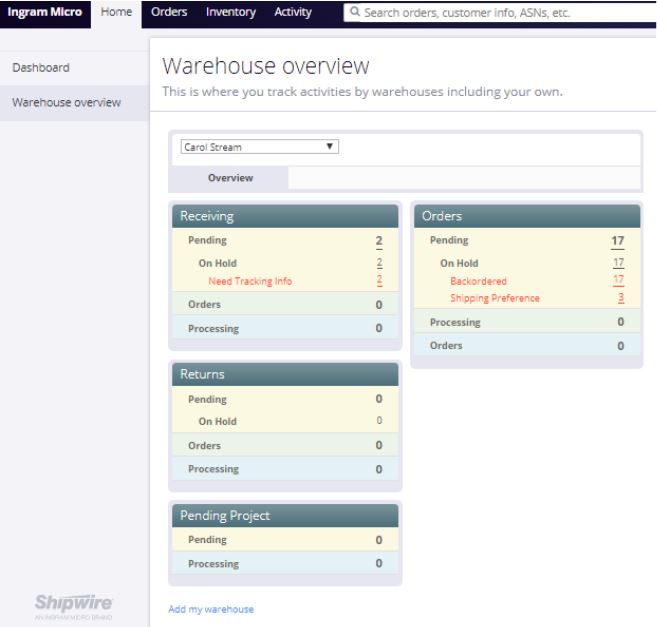
To add locations, navigate to Home > Warehouse Overview and select ‘Add my warehouse’ at the bottom of the screen.
Add inventory to your new locations
After you have added your locations, you need to update them with current physical inventory counts. There are two options to do this:
Manually updating inventory
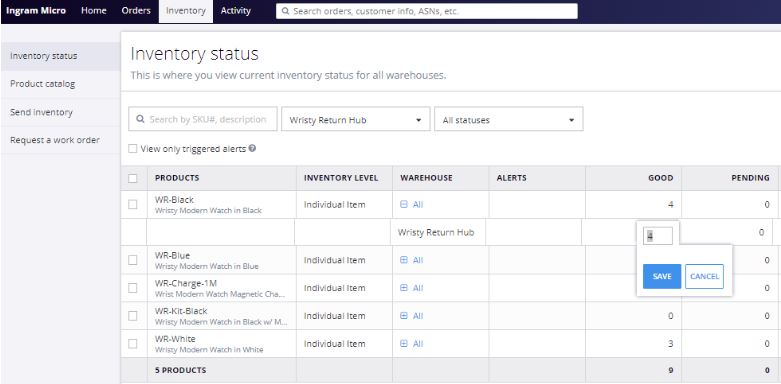
You can update your Shipwire Anywhere location inventory manually at any time. This is a good option for ongoing updates for inventory that exits a facility not on an outbound order tracked in the Shipwire Platform. To do this, simply navigate to Inventory > Inventory Status and select the Shipwire Anywhere location on the warehouse drop down menu. Expand the warehouse column and double click on the inventory to update manually.
By way of Inbound Receiving Order (ASN)
Create an inbound receiving order and ‘send’ your Shipwire Anywhere location inventory systematically. See the Receiving Order support page with step-by-step instructions.
Receive orders and manage routing
Knowing where your orders are takes just a quick glance at your dashboard (Home > Dashboard). From the dropdown menu, you can view Ingram Micro warehouses or your own Shipwire Anywhere locations.
Your order can be routed automatically or manually — your choice. The shipping rate optimization considers your locations together with Ingram Micro fulfillment centers to determine the lowest cost shipping option based on proximity and stock levels. Be sure to update your Shipping Preferences in your Shipwire Account to meet your business requirements.
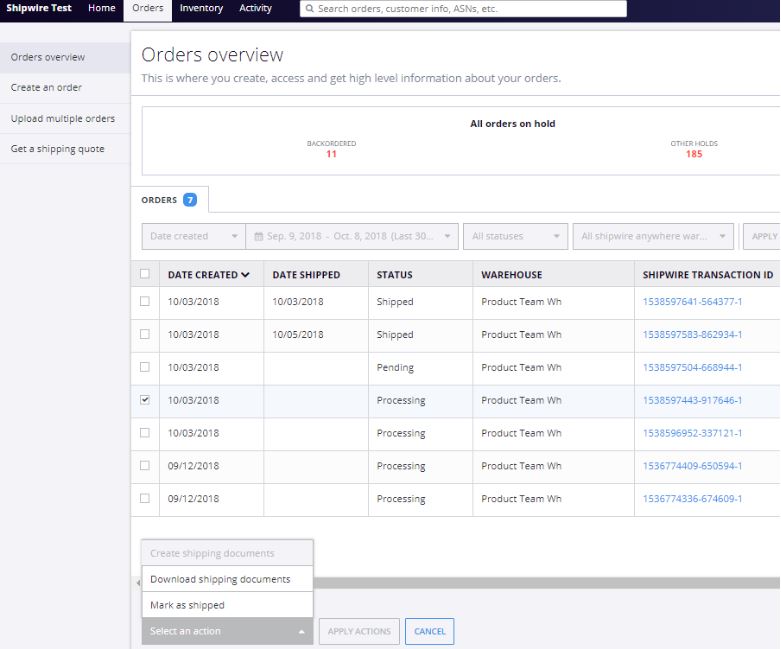
View orders and take action from Orders > Orders Overview. Select one or more orders and download shipping documents (label and packing list) or mark as shipped. From this view, you can see a comprehensive overview of all your orders, filter by warehouse, status, date, etc. for your convenience.
Shipwire Anywhere FAQ
What is Shipwire Anywhere?
Shipwire Anywhere is part of the Shipwire Platform that allows one to manage orders and inventory no matter where product is fulfilled from. With flexible options of utilizing Ingram Micro warehouses, your own physical fulfillment locations, or a combination of both, Shipwire serves as a single portal to manage all eCommerce orders for simple organization and optimized fulfillment. Add any location that you physically fulfill inventory out of to Shipwire to create a comprehensive overview of your orders and inventory through a single dashboard.
What problem does Shipwire Anywhere solve?
Many businesses don’t outsource 100% of their order fulfillment. Shipwire Anywhere is designed for today’s online seller who ships from any physical location, whether that be an existing warehouse, garage, office, repair/refurbishment center, or an Ingram Micro fulfillment center, or any combination of locations.
One Shipwire account gives you the power to automate all your order processing. Route orders to inventory maintained in Ingram Micro fulfillment centers or your own ship-from locations, or a combination of both. See all your sales orders and inventory levels in one comprehensive account dashboard.
How do the different locations operate?
Shipwire Anywhere allows the Shipwire Platform to serve customers utilizing their own ship-from locations and/or in combination with Ingram Micro locations.
When shipping from Shipwire Anywhere locations (i.e. your own fulfillment locations), everything works pretty much the same way except for the physical shipping. You handle physical order fulfillment instead of Shipwire. This means you get the product from inventory (pick); put it in a package (pack); print and apply a label from your Shipwire Account and put it in the mail or give it to a carrier (ship). Once an order is out the door, Shipwire then takes over to follow up with your buyers and update your store with inventory levels and automated tracking.
What can a location be?
A Shipwire Anywhere location can be any place that you have inventory such as retail stores, offices, warehouses, garages, or storage units. Basically, anywhere you store goods.
Can I utilize Shipwire Anywhere to manage my Dropship Vendors?
Yes. You can simply add your dropship vendors as Shipwire Anywhere locations and allocate inventory to those vendors. Through this method, you are connecting all of your retail channels to the Shipwire Platform, allowing inventory management and information sharing between you and your dropshippers through a single dashboard.
What if my locations are outside the United States?
At this time, international shipping is not supported for Shipwire Anywhere locations. Contact our Customer Care Team at customercare@ingrammicroservices.com to learn more about future capabilities and our current global warehouse network to support in the interim.
How do I define a new location within my Shipwire account?
In your Shipwire account, go to Home > Warehouse Overview and click “Add my warehouse.” You will enter the location address and other details we need to automate your order routing and shipping rate calculations.
How can I edit the name of my Shipwire Anywhere location(s)?
Please contact our Customer Care Team at customercare@ingrammicroservices.com to assist in editing Shipwire Anywhere location names and/or deleting a Shipwire Anywhere location.
How can I add or edit the cartons/package sizes available in my Shipwire Anywhere locations?
Please contact our Customer Care Team at customercare@ingrammicroservices.com about loading your Shipwire Anywhere location carton dimensions and weights into the system for proper optimization through the Shipwire Platform.
How do my own locations work with my other e-commerce tools? For example eBay, PayPal, Amazon or my Magento or Shopify Store?
All of the growing list of Shipwire “sell” e-commerce order automation tools work regardless of where orders are routed to – Shipwire locations, or customer-maintained ship-from locations.
How I define inventory levels at my locations?
Once you define your products in your Shipwire account (Product Catalog), you can add inventory to your Shipwire Anywhere locations. There are two options:
Manually updating inventory: You can update your Shipwire Anywhere location inventory manually at any time. This is a good option for ongoing updates for inventory that exits a facility not on an outbound order tracked in the Shipwire Platform. To do this, simply navigate to Inventory > Inventory Status and select the Shipwire Anywhere location on the warehouse drop down menu. Expand the warehouse column and double click on the inventory to update manually.
By way of Inbound Receiving Order (ASN): Create an inbound receiving order and ‘send’ your Shipwire Anywhere location inventory systemically. See the Receiving Order support page with step-by-step instructions. Remember to mark the ASN as COMPLETE to update the inventory level.
How do I re-assign orders between Ingram Micro facilities and my own?
You can easily change order routing manually. Change your mind and re-route any order before the order drops to a particular warehouse. By default, orders route to where you have inventory available for shipping and to locations that are geographically closest to the buyer’s ship-to address. You can manually reroute any order before the drop time by clicking into the order and changing the ship-from warehouse to that of your choice in step 2.
Alternatively, you can change your automatic routing preferences at any time by navigating to your Profile > Shipping > Shipping Preferences.
There is an order at one of my locations; how do I print labels and complete the order?
It is a simple process.
- View orders and take action from Orders > Orders Overview.
- Select an order and create and download shipping documents (label and packing list)
- Mark order as shipped.
You can then let Shipwire’s automated order processing take over to complete your customer follow up with shipping confirmation, tracking and a thank-you email. Manage these options by navigating to your Profile > Orders & Returns Settings.
Can I use my own carrier/shipping accounts to ship orders from my Shipwire Anywhere locations?
Yes! Navigate to your Profile > Shipping > Shipping Preferences and enter third party carrier shipping account information under ‘Additional Carrier Preferences.’