


Effective Feb. 27, 2015, the new Shipwire V3 UI (User Interface) is being released for General Availability. For more information on all the enhancements, please visit our blog post.
Please note which version of the application your account is currently using, and follow the corresponding instructions below.
You can tell which version you are using by examining the URL after you login to your account.
V2 = app.shipwire.com
V3 = merchant.shipwire.com
Definition and example of master cases
If you purchase merchandise in bulk, typically from overseas, it is very important that you pay attention to how it is packaged for shipment to you.
- How many individual units are in an Inner Pack?
- How many Inner Packs are in a Master Case?
- What is in a shippable carton/package and what is in retail packaging or loose and must be “pick and packed” into a shipping package?
Master Cases should only include 1 type of individual SKU inside (multiple SKU numbers in 1 Master Case is called a “Mixed Case”) to make it easier to break down and ship individuals. A Mixed Case with more than one type of SKU in it isn’t subject to Master Case lot break pricing. Breaking down mixed SKU “kit” or “mixed case” may result in hourly Project charges when separating into individual shippable units.
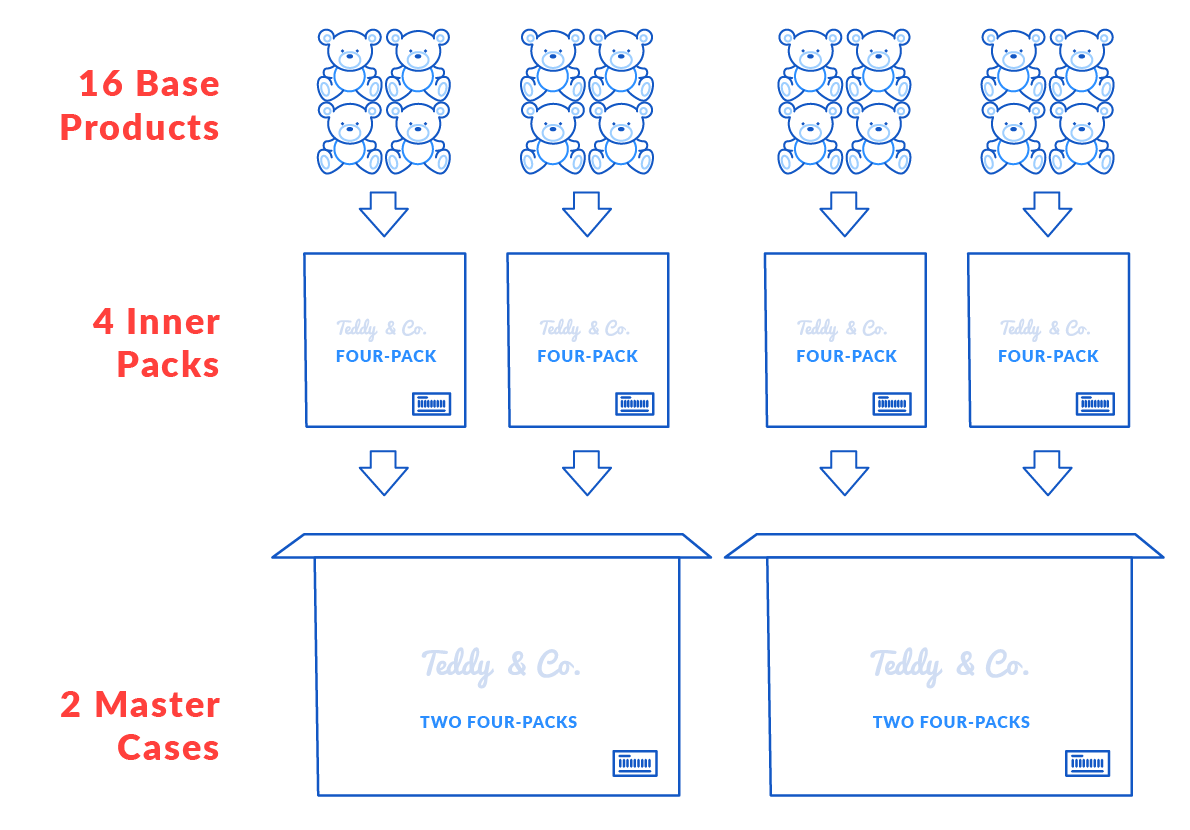
Here is an example of what we are talking about. You may have paid for 16 base products, but they come packaged 4 to a Inner Pack, with 2 Inner Packs to a Master Case.
But the big question is: how will you ship it to your customers? Shipwire can’t just store the master cases, and sometimes ship 1 base product, and sometimes ship 1 Inner Pack. That would complicate your inventory, with you not knowing how many are left in a Inner Pack or Master Case. Instead, we require you to divide your inventory into shippable groups. The example below shows you breaking this inventory into 2 Inner Packs, and 8 Base Product.
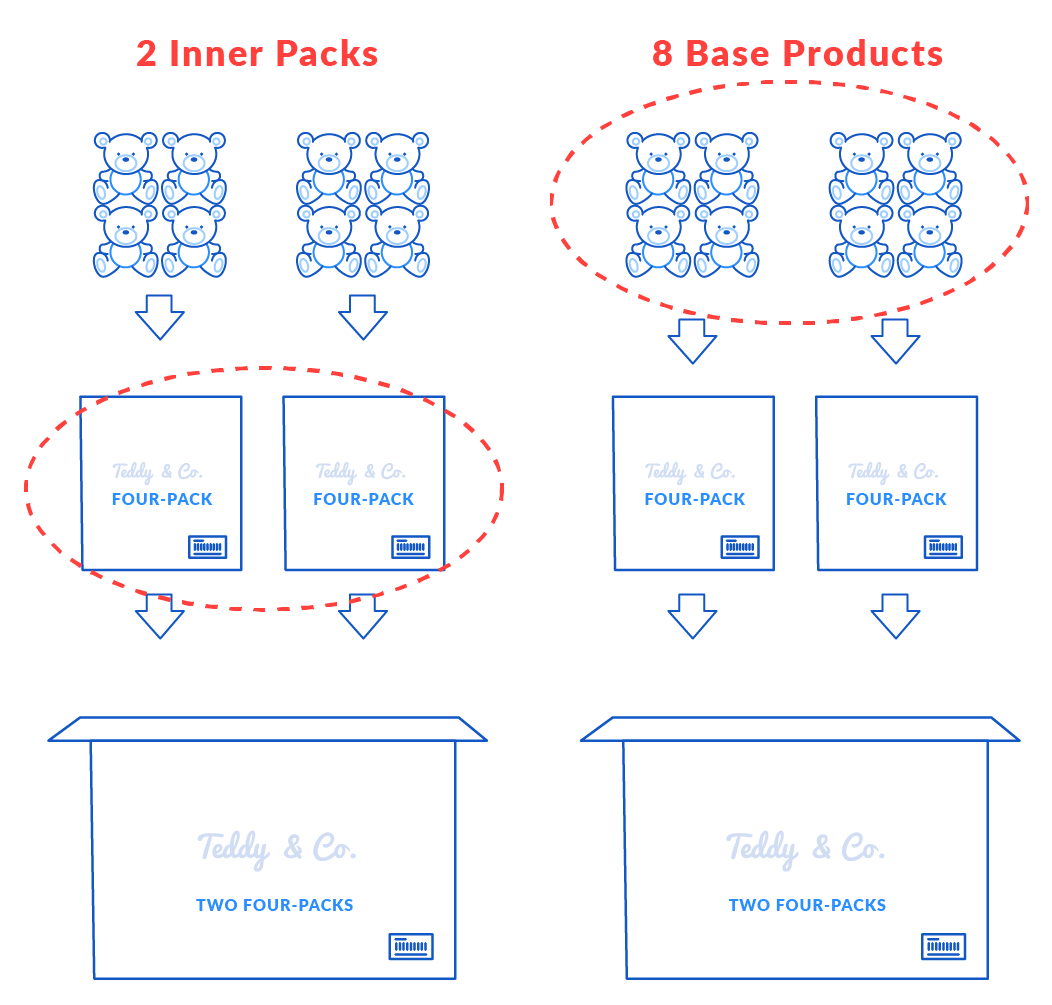
You must set up two unique product IDs, or SKUs (stock keeping units). In this case, you choose TED1 for a single teddy bear, and TED1IP4 for the Inner Pack of four teddy bears. Note that you have configured TED1 as a pick and pack, because you want Shipwire to always package this item before shipping it to a customer. You have configured TED1IP4 as a pre-packaged and ready-to-ship, because you want Shipwire to use the existing package.
Defining the master case
| SKU | Type | Description |
|---|---|---|
TED1IP4 |
Pre-packed and Ready-to-Ship |
Inner Pack of 4 Teddy Bears |
TED1 |
Pick and Pack |
Teddy Bear |
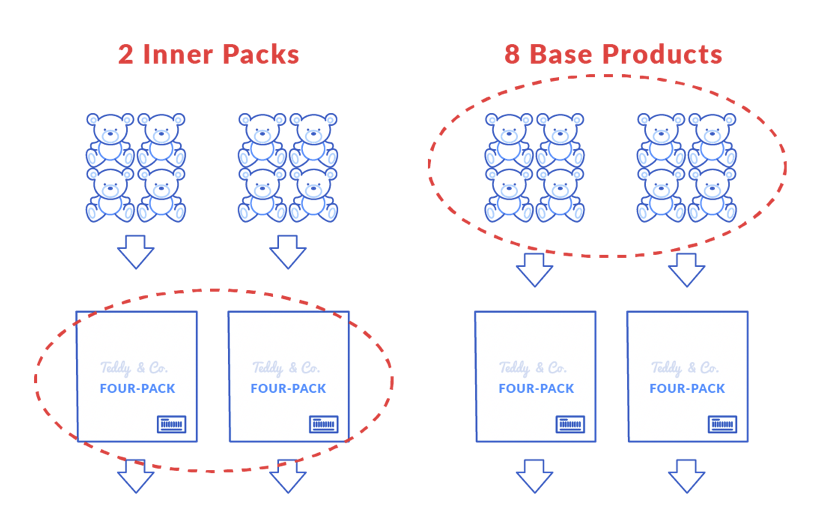
When you give advance notice of incoming merchandise, you will tell Shipwire that you are sending 8 single teddy bears, and 2 Inner Packs of four teddy bears.
| SKU | Quantity | Type | Description |
|---|---|---|---|
TED1C4 |
2 |
Pre-packed and Ready-to-Ship |
Inner Pack of 4 Teddy Bears |
TED1 |
8 |
Pick and Pack |
Teddy Bear |
Then when you want Shipwire to ship a single teddy bear, you will place an order for TED1. When you want Shipwire to ship an Inner Pack, you will place an order for TED1IP4.
Shipping a master case that is not a kit
If you are sending a case containing different SKUs (either units or smaller inner cases) and do not wish to keep it as a kit, it will be broken down when it is received by the fulfillment center and its contents will be inventoried. In this case you do not include KEEP AS KIT on the label. Labeling for this type of shipment has specific requirements.
See our label specifications for this type of case.
Automated breaks – master case and individual unit handling
Save a lot of money by sending your inventory to Shipwire in wholesale bulk quantities and packaging (master case); but, maintain the ability to ship B2B (wholesale, master case, inner pack) and B2C (individual unit shipments).
Automated breaks allow you to keep all you inventory as wholesale and let Shipwire decide when to “break bulk” to ship your individual Shipment.
What Qualifies: Master Case with a single type of SKU inside. Mixed Cases (multiple SKU types inside) must be broken down using our Project handling to ensure proper labeling and inventory management.
Here is how it works: As single unit B2C orders come in for a particular SKU, Shipwire will first look for loose inventory. If there is no individually counted inventory available, Shipwire will look for the same SKU in bulk/wholesale packaging. When present, Shipwire will automatically convert the cases into single unit inventory. As orders are shipped normal item count handling charges apply.
Bulk Shipment Optimization: If Shipwire receives an order that can be more efficiently configured by pulling from Case SKUs (assuming available inventory), Shipwire will use these to minimize the number of items being shipped. Shipwire will charge you only for the number of items processed in the optimized order.
To enable this feature: Please contact customer support to have your products quickly reviewed for system setup and Bulk – Individual association. Once enabled by Shipwire team, you will see new automation options in your Account under Shipping Preferences.
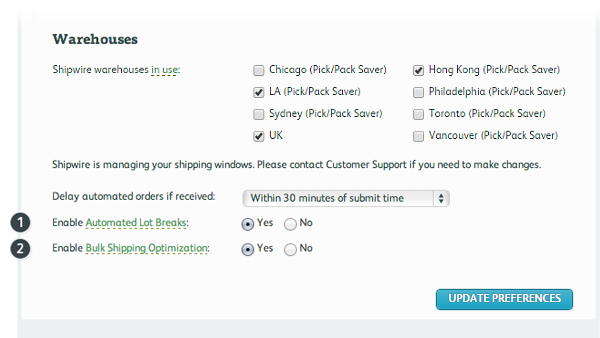
- Enable Automated Lot Breaks – allows you to keep all you inventory as wholesale and let Shipwire decide when to “break bulk” to ship your individual Shipment. Shipwire will charge you only for the number of items processed in the optimized order.
- Enable Bulk Shipping Optimization – if Shipwire receives an order that can be more efficiently configured by pulling from Case SKUs (assuming available inventory), Shipwire will use these to minimize the number of items being shipped. Shipwire will charge you only for the number of items processed in the optimized order.
This is referred on the site as: Automated Lot Breaks, Automated Break Lots, lot breaks, B2B lot breaks, wholesale shipping, B2C shipping, and master case breaks.
When do I configure my account?
When you notify Shipwire of incoming merchandise, you list the exact product IDs and quantities you are sending. Shipwire then inventories your merchandise as you specify. This means that you need to do all your planning and packaging before sending merchandise. This may include scheduling delivery appointments for pallet shipments. Refer to the Receiving Guide to determine whether or not an appointment needs to be made.
Important Note: Plan ahead, having your manufacturer build your Inner Packs and Master Cases is much more cost effective than asking Shipwire to do it when the inventory is received. Failing to plan and package bulk items before sending merchandise to Shipwire will result in hefty project fees and delays to your receiving (hourly costs + materials + sample shipments to you) to build up master cases at the point of receiving. Once products are received and inventoried you will incur per item outbound item fees and project fees to build inventory into larger lots or cases. To avoid these project fees, Shipwire highly recommends you work with your supplier on packaging and send us bulk items in the ASN.
Can Shipwire split my inventory on an order by order basis?
No, Shipwire can’t just store the master case, and sometimes ship 1 base product, and sometimes ship 1 Inner Pack. That would complicate your inventory, with you not knowing how many are left in a inner pack. Instead, we require you to divide your inventory into shippable groups at the time of receiving.
Definition and example of master cases
If you purchase merchandise in bulk, typically from overseas, it is very important that you pay attention to how it is packaged for shipment to you.
- How many individual units are in an Inner Pack?
- How many Inner Packs are in a Master Case?
- What is in a shippable carton/package and what is in retail packaging or loose and must be “pick and packed” into a shipping package?
Master Cases should only include 1 type of individual SKU inside (multiple SKU numbers in 1 Master Case is called a “Mixed Case”) to make it easier to break down and ship individuals. A Mixed Case with more than one type of SKU in it isn’t subject to Master Case lot break pricing. Breaking down mixed SKU “kit” or “mixed case” may result in hourly Project charges when separating into individual shippable units.
Here is an example of what we are talking about. You may have paid for 16 base products, but they come packaged 4 to a Inner Pack, with 2 Inner Packs to a Master Case.
But the big question is: how will you ship it to your customers? Shipwire can’t just store the master cases, and sometimes ship 1 base product, and sometimes ship 1 Inner Pack. That would complicate your inventory, with you not knowing how many are left in a Inner Pack or Master Case. Instead, we require you to divide your inventory into shippable groups. The example below shows you breaking this inventory into 2 Inner Packs, and 8 Base Product.
You must set up two unique product IDs, or SKUs (stock keeping units). In this case, you choose TED1 for a single teddy bear, and TED1IP4 for the Inner Pack of four teddy bears. Note that you have configured TED1 as a pick and pack, because you want Shipwire to always package this item before shipping it to a customer. You have configured TED1IP4 as a pre-packaged and ready-to-ship, because you want Shipwire to use the existing package.
Defining the master case
| SKU | Type | Description |
|---|---|---|
TED1IP4 |
Pre-packed and Ready-to-Ship |
Inner Pack of 4 Teddy Bears |
TED1 |
Pick and Pack |
Teddy Bear |
When you give advance notice of incoming merchandise, you will tell Shipwire that you are sending 8 single teddy bears, and 2 Inner Packs of four teddy bears.
| SKU | Quantity | Type | Description |
|---|---|---|---|
TED1C4 |
2 |
Pre-packed and Ready-to-Ship |
Inner Pack of 4 Teddy Bears |
TED1 |
8 |
Pick and Pack |
Teddy Bear |
Then when you want Shipwire to ship a single teddy bear, you will place an order for TED1. When you want Shipwire to ship an Inner Pack, you will place an order for TED1IP4.
Shipping a master case that is not a kit
If you are sending a case containing different SKUs (either units or smaller inner cases) and do not wish to keep it as a kit, it will be broken down when it is received by the fulfillment center and its contents will be inventoried. In this case you do not include KEEP AS KIT on the label. Labeling for this type of shipment has specific requirements.
See our label specifications for this type of case.
Automated breaks – master case and individual unit handling
Save a lot of money by sending your inventory to Shipwire in wholesale bulk quantities and packaging (master case); but, maintain the ability to ship B2B (wholesale, master case, inner pack) and B2C (individual unit shipments).
Automated breaks allow you to keep all you inventory as wholesale and let Shipwire decide when to “break bulk” to ship your individual Shipment.
What Qualifies: Master Case with a single type of SKU inside. Mixed Cases (multiple SKU types inside) must be broken down using our Project handling to ensure proper labeling and inventory management.
Here is how it works: As single unit B2C orders come in for a particular SKU, Shipwire will first look for loose inventory. If there is no individually counted inventory available, Shipwire will look for the same SKU in bulk/wholesale packaging. When present, Shipwire will automatically convert the cases into single unit inventory. As orders are shipped normal item count handling charges apply.
Bulk Shipment Optimization: If Shipwire receives an order that can be more efficiently configured by pulling from Case SKUs (assuming available inventory), Shipwire will use these to minimize the number of items being shipped. Shipwire will charge you only for the number of items processed in the optimized order.
To enable this feature: Please contact customer support to have your products quickly reviewed for system setup and Bulk – Individual association. Once enabled by Shipwire team, you will see new automation options in your Account under Shipping Preferences.
- Enable Automated Lot Breaks – allows you to keep all you inventory as wholesale and let Shipwire decide when to “break bulk” to ship your individual Shipment. Shipwire will charge you only for the number of items processed in the optimized order.
- Enable Bulk Shipping Optimization – if Shipwire receives an order that can be more efficiently configured by pulling from Case SKUs (assuming available inventory), Shipwire will use these to minimize the number of items being shipped. Shipwire will charge you only for the number of items processed in the optimized order.
This is referred on the site as: Automated Lot Breaks, Automated Break Lots, lot breaks, B2B lot breaks, wholesale shipping, B2C shipping, and master case breaks.
When do I configure my account?
When you notify Shipwire of incoming merchandise, you list the exact product IDs and quantities you are sending. Shipwire then inventories your merchandise as you specify. This means that you need to do all your planning and packaging before sending merchandise. This may include scheduling delivery appointments for pallet shipments. Refer to the Receiving Guide to determine whether or not an appointment needs to be made.
Important Note: Plan ahead, having your manufacturer build your Inner Packs and Master Cases is much more cost effective than asking Shipwire to do it when the inventory is received. Failing to plan and package bulk items before sending merchandise to Shipwire will result in hefty project fees and delays to your receiving (hourly costs + materials + sample shipments to you) to build up master cases at the point of receiving. Once products are received and inventoried you will incur per item outbound item fees and project fees to build inventory into larger lots or cases. To avoid these project fees, Shipwire highly recommends you work with your supplier on packaging and send us bulk items in the ASN.
Can Shipwire split my inventory on an order by order basis?
No, Shipwire can’t just store the master case, and sometimes ship 1 base product, and sometimes ship 1 Inner Pack. That would complicate your inventory, with you not knowing how many are left in a inner pack. Instead, we require you to divide your inventory into shippable groups at the time of receiving.