


Shipwire makes it easy to handle and manage your customers’ returns by providing several tools and services to ease the transaction. With flexible options to match your return policy, our warehouses can receive, process, and restock the items into your inventory.
Handling fees on returns
Returns being received by a Shipwire warehouse go through a handling process in order to be restocked and inventoried.
Standard per-unit order handling charges apply.
Note: Returns do not qualify for Pick and Pack Saver discounts.
Creating a return authorization (RMA)
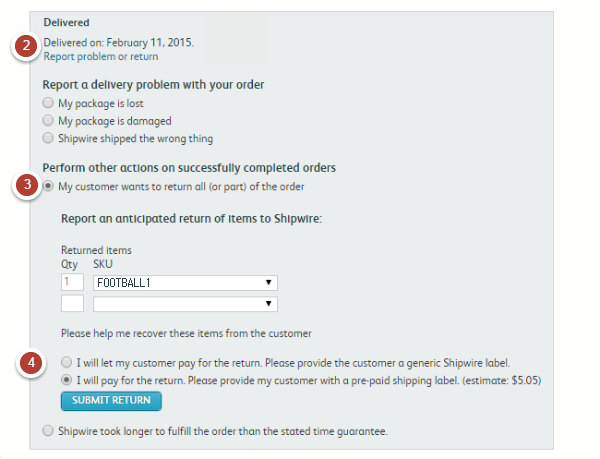
If your customer is sending merchandise back to the warehouse, Shipwire will automatically generate a Return Materials Authorization (RMA) label, which MUST be placed on the return. This will ensure that Shipwire can quickly add it back to your inventory while also keeping inventory counts accurate. To create an RMA, please follow the steps below:
- Log in to your Shipwire account and enter the order number in the search bar at the top of the page. Click on that order.
- You can also find the order by going to the Account Activity page, filtering by shipped orders.
- Click on “Report a Problem or Return” (underneath the order status at the top of the page).
- Select the “My customer wants to return all (or part) of the order” option, then filling which and how many SKUs the customer wants to return.
- Select who will be paying for the return shipping.
- I will let my customer pay for the return. Please provide the customer a generic Shipwire label.
- This option will provide a proper shipping label to our warehouse. The customer should download this label and tape it on the return package and take it to the postal facility of their choice. A carrier with tracking is recommended. Your customer is responsible for the shipment so it is also recommended that they insure the package.
- I will pay for the return. Please provide my customer with a pre-paid shipping label.
- This option is available only in the US.
- The estimated value of the return postage is shown in parentheses. Shipwire will automatically select the lowest cost service level. Your account will be charged the return postage and your customer can either schedule a pick up (if available) or take it to the nearest facility that matches the postage carrier.
- Locations where this feature is currently unavailable, you should still have your customer use the downloaded label. Have them send you the cost of returning the product and organize a refund to them. This is 100% the responsibility of you, the merchant.
- Insuring the package is recommended in any scenario.
- Click on “Submit Return” and your customer will automatically be sent the return label (generic or prepaid) to the email listed in their order. You will also receive a copy and can also refer back to the order in the event that the customer’s provided email is incorrect or missing so that you can forward the RMA to the correct address.
- Once the return arrives at our warehouse, we will process it within 2-5 business days of delivery. We will determine the quality of the item returned and send an alert to your Shipwire account.
Tracking returns
If the return label is prepaid, tracking is immediately available and you can track the return back to the warehouse. When the label is not prepaid, please ensure that your customer provides tracking to you if you wish to track the return.
Once the return is processed at the warehouse, Shipwire will determine whether it is in good condition or damaged. You will receive a message regarding the order on your dashboard and by clicking on its details to learn more. You will see whether it was returned in good condition and back in inventory, or if it was damaged and no longer available for fulfilling orders.
Note: This process is also duplicated for returns due to undeliverable addresses, customer unavailability to receive orders, customer rejection of orders, and any other related returns issues.
Damaged returns
When the warehouse returns your item(s) as damaged, you have the option to file a claim for damaged goods if you have outbound insurance. The damaged goods are placed in a section with other damaged goods and eventually discarded. If you would like to have the damaged items shipped back to you, please follow the instructions below.
- Create an outbound order and include the damaged item SKU(s).
- On the order details screen, select “Work Order.”
- Fill out the title and description, indicating that the units on this particular order are for damaged units.
- SUBMIT REQUEST.
Returns without RMA
In instances where a customer may send their return without contacting you for a return label (simply putting it in a package and sending it to our warehouse), we will attempt to match the return with the customer and the order. This is done on a best effort basis. Please note that further research of unidentified returns must be covered with a Work Order and thus may incur a fee to cover the investigation.
Automate your returns
Shipwire now has a Returns API that allows automating several aspects of the returns process, in addition to gathering relevant return information. Learn more about our Returns API and how it can help you.
Return Carriers and Service Levels
The Shipwire platform will automatically select the most cost effective return carrier and service level, unless specified otherwise. For example, an outbound shipment sent via FedEx 2 Day will be returned via the most cost effective method possible, therefore it could be sent back USPS, DHL Global Mail, or any other carrier and service level that is more cost effective than the outbound shipping method.