


About
eBay is an online marketplace where buyers and sellers come together and trade almost anything. Whether you use eBay fulfillment services to sell a few items a week or are an established merchant with multiple retail channels, it’s easy to automate the fulfillment of eBay auction items and fixed-price listings using Shipwire.
| Connection Information | |
|---|---|
| Who developed integration: | Shipwire |
| Support Contact: | Website |
| Status: | Clients actively using the connection, no known issues |
| Integrated APIs | |
| Inventory: | |
| Order Entry | ✔ |
| Shipping Rates | |
| Tracking | ✔ |
On this page
Features
Order Entry – Orders are submitted to Shipwire from your e-commerce store automatically via our Order Entry API. Once your online store receives an order, Shipwire takes care of the rest.
Order Tracking – All tracking information related to completed shipments, including expected delivery dates, is pulled automatically into eBay. Note: Order tracking is not available for the eBay via PayPal connection. (See the Configuration section below for more details on the different methods of connecting your eBay cart.)
Configuration
You can use Shipwire as a fulfillment partner in one of the two ways:
- Connecting directly through eBay – recommended
- Connecting via PayPal IPN
Do not connect via both methods, as this will result in duplicate orders.
Direct eBay connection
First Find and connect your cart (eBay) within your Shipwire account, then follow the steps below to configure it.
- After installing eBay as a Sell Tool, click Add Account, then click Connect to eBay, enter the required account information, and grant Shipwire access to it so that order notification can be communicated.
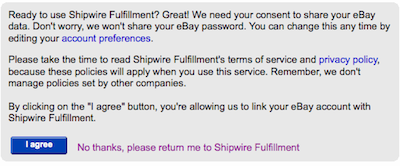
- After logging in, select “I agree” and you’ll be redirected back to your Shipwire Account.
- Next, configure relevant eBay listings. Your eBay Transaction Record must have the Shipwire SKU so we know what to ship.
- If your eBay account allows to add SKU names and variations make sure that you set those SKU names in accordance with your Shipwire SKUs, aliases or bundles.
- If your eBay account doesn’t allow SKU names or variations, make sure to add the following code to the HTML of your eBay listing:
<!--SWSKU:sku_name-->
Example: For a SKU named MD583L you would add the code <!--SWSKU:MD583L-->
- Now it’s time to enable features. Check “Automatic Order Fulfillment” to direct Shipwire to start polling the eBay servers for new orders. We will query eBay hourly looking for new transaction records. Shipwire uses the eBay Transaction Record to get order details.
- If you want Shipwire to push shipment tracking information synchronized with your eBay account for buyer messaging, check “Automatic Tracking Status Update”. Once your order ships, we will automatically push tracking information into Ebay and change the order status to “Shipped”.
eBay via PayPal connection
NOTE: We recommend connecting to eBay via the “Direct eBay connection” instructions above. If you have already done that, do not complete the following PayPal instructions, as that will result in duplicate orders coming in to Shipwire.
First, find and connect your cart (PayPal IPN) within your Shipwire account, then follow the steps below to configure it.
- After installing eBay via Paypal as a Sell Tool, go to eBay to setup the auction or fixed price listing. Select PayPal as the only payment method you will accept, and setup the eBay listing.
- If your eBay account allows to add SKU names and variations make sure that you set those SKU names in accordance with your Shipwire SKUs, aliases or bundles.
- If your eBay account doesn’t allow SKU names or variations, make sure to add the following code to the HTML of your eBay listing:
<!--SWSKU:sku_name-->
Example: For a SKU named MD583L you would add the code <!--SWSKU:MD583L-->
- Now go to Paypal to configure your PayPal account. Click here to configure your PayPal buy-now buttons to send orders to Shipwire. Click here to configure your PayPal IPN to send orders to Shipwire.
- Conduct a test auction from eBay and check your Shipwire account to confirm that order information is communicated correctly.
Setting Up eBay Product Listings with Variations
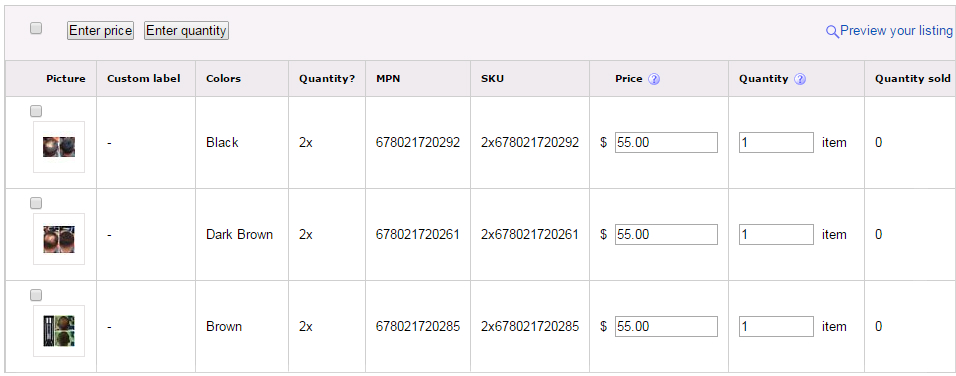
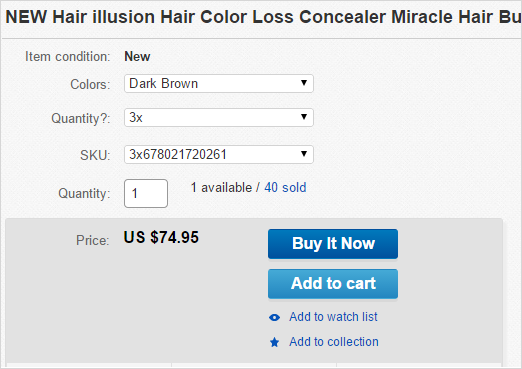
If you are selling products that have color, size or quantity variation, you will need to have a unique SKU for each variation in Shipwire. Rather than creating a new product listing, the following instructions will illustrate how to assign and map the unique SKUs to each permutation.
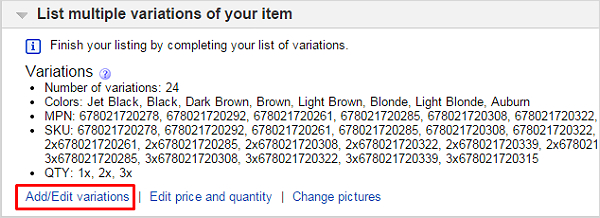
- Begin by going into your eBay product listing and locating the List multiple variations of your item section. Click the Add/Edit variations link.
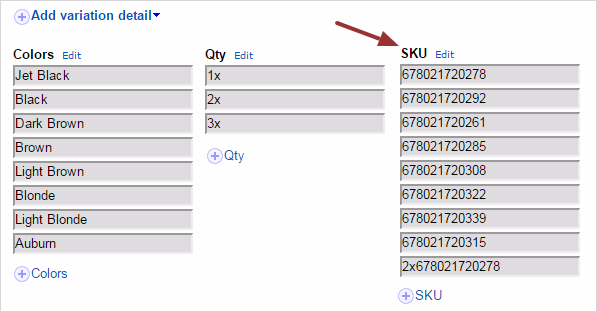
- Set up your variations (ie. Color, Size, Quantity). You must title the SKU variation field as SKU, otherwise Shipwire will not pull the order. If preferred, you may use Alternative names for your SKU listing.
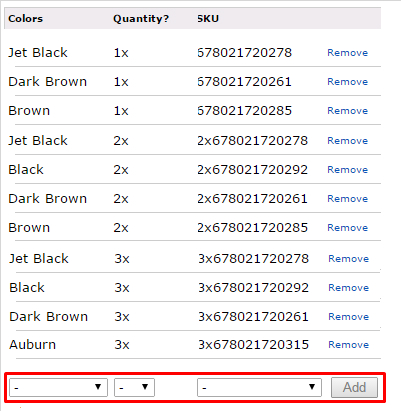
- When reviewing your variations, you will be able to match up your SKUs to the variation. Simply select a SKU, then the corresponding color, quantity, etc for that SKU and click Add.
- If you’re selling multiple units in a single pack, you will also need to set price points for bundles.
- Once complete, your listings should look like this:
FAQ
Q.Why are my orders duplicated?
A.Orders may be duplicated if the eBay account has PayPal checkout, and a connection to Shipwire is established both via eBay and via PayPal IPN. To avoid this issue, set up your connection only via one route, not both.
Q.Which connection method should I use?
A.The Direct eBay connection is a newer connection platform, and will offer more Features (see the Features section above). If you are not already using the PayPal integration for your other stores, we recommend using the Direct eBay connection. However if you are using the PayPal IPN connection, do not add the Direct eBay connection, as it will result in order duplicates.
Q.Why must PayPal be the only payment method when using eBay via PayPal?
A.When you set up your eBay connection via PayPal, Shipwire receives all eBay orders through PayPal. If an eBay order is processed through a payment method other than PayPal, Shipwire will not receive this order. To have more than one method payment on eBay make sure to use the Direct eBay connection (in which case you should not connect your Shipwire account to PayPal IPN).
Q.I don’t see my eBay order in Shipwire?
A.While Shipwire pulls all eBay orders immediately, the orders will not be fully uploaded until we receive a confirmation from eBay (or PayPal, if you are connected to eBay via PayPal) that a payment was processed. Please check your eBay account to make sure that the orders have been marked as paid. If payment is received outside of eBay, you must manually mark the order status as Paid. If you have checked your orders and they aren’t showing up in the Shipwire account even after they were marked as paid, there may be an issue with the eBay connection, and you should contact Shipwire customer care for further assistance.
Q.What if I have an account on eBay.ca or another non-US eBay website?
A.When you set up the connection, you’ll be directed to the eBay.com website. Simply enter your eBay credentials and it will link up. eBay has unified logins between all their individual websites.